Recently, several customers have reported issues with their Neuro Lavalamps, including delivery damage, heating problems, and unexpected color changes.
The recently delivered Neuro Lavalamp, a custom-made lavalamp that can sync the colors to Neuro's lavalamp live on stream, have reportedly encountered a range of technical and quality control issues according to user reports across the merch channels and discussion threads within the Discord server.
Since the product's arrival to customers earlier these past weeks, several customers have shared reports about broken liquid bases on delivery, failure to heat up properly, color discoloration, and synchronization issues with the Swarm Sync app which is used to sync the lavalamp's colors to Neuro's stream via Tuya integration. While many units are functioning normally, others are not so lucky. Unfortunately, this happens with regular lavalamps too and this is not an issue with the Neuro lavalamp specifically.
In this article, I've gathered all current information, user feedback, and official guidance from Juniper Support below to help clarify what’s going on and how to resolve these issues.
Commonly Reported Problems
Lamp not heating or flowing
Some customers report that their lamp remains cold and inactive even after being plugged in for 6–8 hours. Some customers also noted that neither the base nor the glass became warm, suggesting potential issues with the heating element or the power adapter.
"So it's been about 8 hours since I've plugged in my lava lamp and it's still not making bubbles nor is it hot, the glass nor base of it is hot, am I supposed to take of this thing on the front that looks like a cover to a button? or is mine just not working?"
Fluid turning yellow
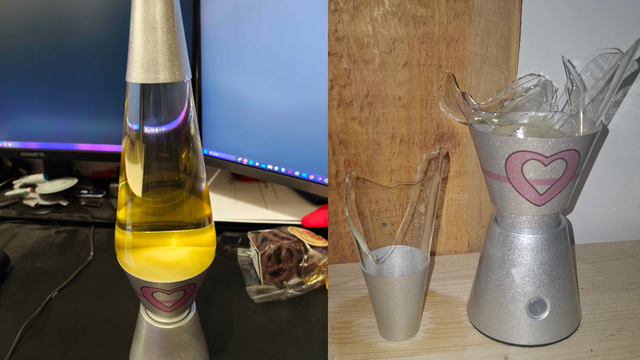
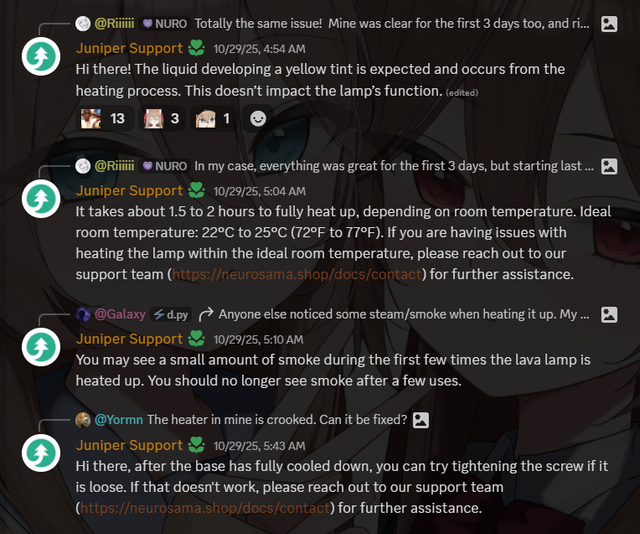
Another common complaint involves the previously clear liquid inside the lamp when it was first delivered, gradually turning yellow after a few days of use. Many customers and users initially believed this to be a defect or contamination.
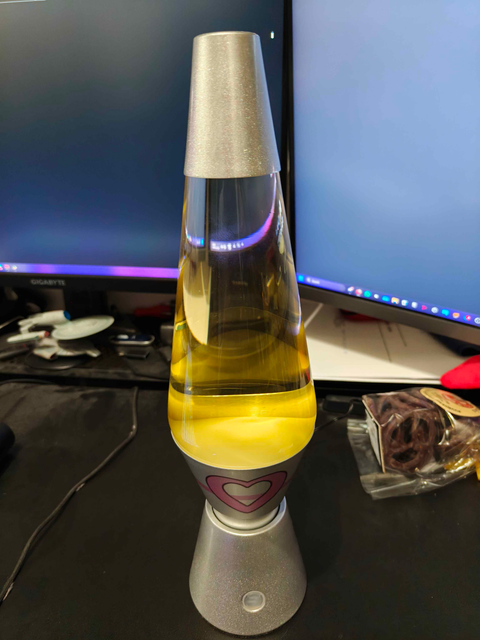
"Not software related, but has there been a case of the lamp fluid turning yellow? since mine looks like piss rn when its off (was clear the first 3 days, also idk where to ask this since i cant find a hardware problem discussion)"
Juniper Support, however, has since clarified that the yellow tint is expected behavior caused by the heating process and does not affect the lamp’s flow or function. Replacement units would likely develop the same tint after repeated heating cycles.
Delivery damage
Some shipments reportedly arrived with cracked glass bases. Juniper has advised customers with damaged units to contact support immediately for a potential replacement.
One user questioned after receiving a broken unit:
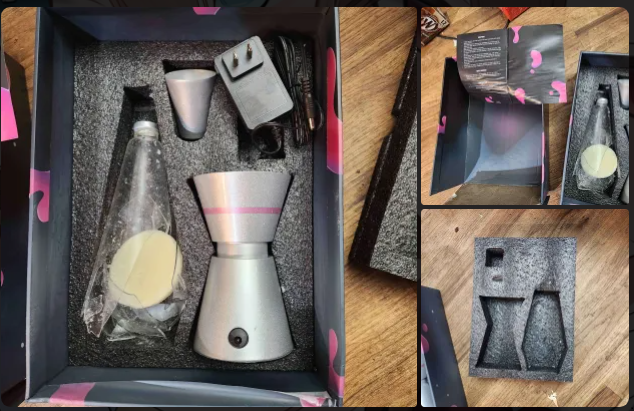
"How likely is it that I can get a replacement since the lamp arrived broken? Still waiting on a response from juniper support since it arrived on the weekend (marked spoiler to not make people sad, let me know if this isn't the appropriate channel)"
Same user followed up with an edit to their message:
"Edit: figured I'd update this, got a response from Juniper, sent them the screenshots, they mentioned the possibility of replacement but still waiting for more info"
Sync and pairing issues
While unrelated to physical lavalamp, users have also experienced difficulty reconnecting the lamp’s bluetooth after initial setup, which the app Swarm Sync needs to function. In one case, a user reported being unable to re-enter pairing mode despite multiple attempts.
"I'm struggling to get my lamp into pairing mode, it's green when it turns on, I've tried power cycling it every 3 seconds but not having any luck"
Support and Safety Warnings
Juniper Creates, the official manufacturer and distributor, has responded to these issues via their support page at https://neurosama.shop/docs/contact, and others have issued a general safety advisory for users currently operating or unboxing their lamps.
⚠️ WARNING
- Make sure the lamp is assembled securely before plugging it in.
- Keep the lamp away from children and pets.
- Do not place it near ledges or unstable surfaces - the glass can break easily if tipped over.
- Allow the lamp to cool completely before handling or attempting any adjustments.
- Avoid placing your lava lamp near air conditioners or moisture sources, as condensation can seep into the heater area and potentially cause electrical hazards.
- If dew or condensation reaches the base, unplug the lamp immediately and let it dry completely before use.
- Always use the lamp in a well-ventilated, dry space away from fabric, paper, or flammable materials.
Affected customers that had their glass bases broken on delivery or any other issues with the lavalamp are encouraged to contact Juniper Creates support at:
A brief video to learn more on how lavalamps work:
For Swarm Sync and issues with pairing, you can ask for support on the official Neuro-sama Discord server and sending your inquiry on this thread:
Server: https://discord.gg/neurosama
Thread: https://discord.com/channels/574720535888396288/1426970657631113376
Frequently Asked Questions (FAQ)
Conclusion
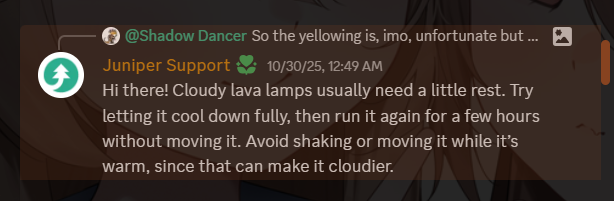
Juniper Creates support team has issued several clarifications since October 29 and is still acknowledging customer reports and concerns within the Discord server while reassuring that most observed effects within the lavalamp were expected and safe.
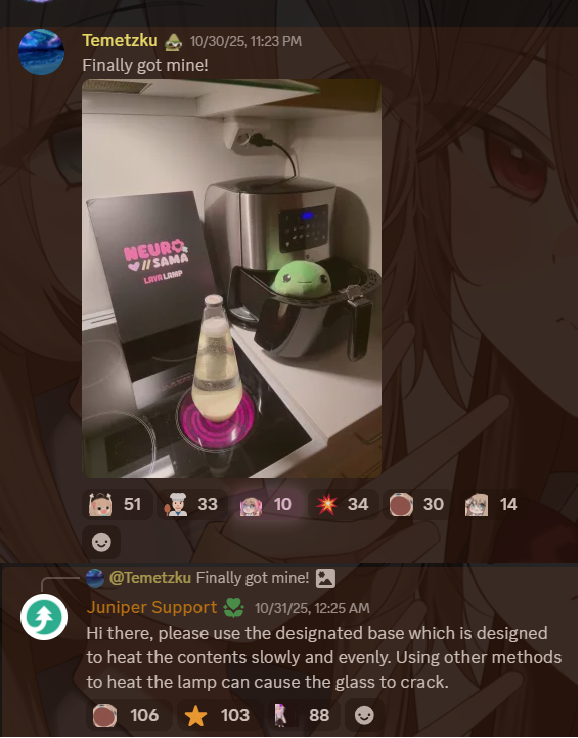
The Neuro Lavalamp has faced some issues even prior to launch, with Juniper Creates issuing partial refunds following delays when manufacturing the lavalamp and informing customers via email but they still managed to deliver such a functioning product despite troubles.
Although the Neuro Lavalamp really is a cool and unique merch product from Neuro and Vedal (maybe, the first VTubers to ever sell custom lavalamps ever), customers are advised to handle it with care and monitor for any weird behaviour during the first several uses. Minor smoke, sound, or color changes are within normal expectations but failure to heat, physical damage, or persistent electrical problems should be reported immediately.
Hope this article helped. Enjoy your lava lamp safely!